NeoFilm — Vintage Film Camera
Analog character. Modern control.
Capture with handcrafted film profiles, create custom recipes, shoot RAW, and develop every frame in NeoFilm’s mobile darkroom. Designed for photographers who value tactile control and authentic film aesthetics.
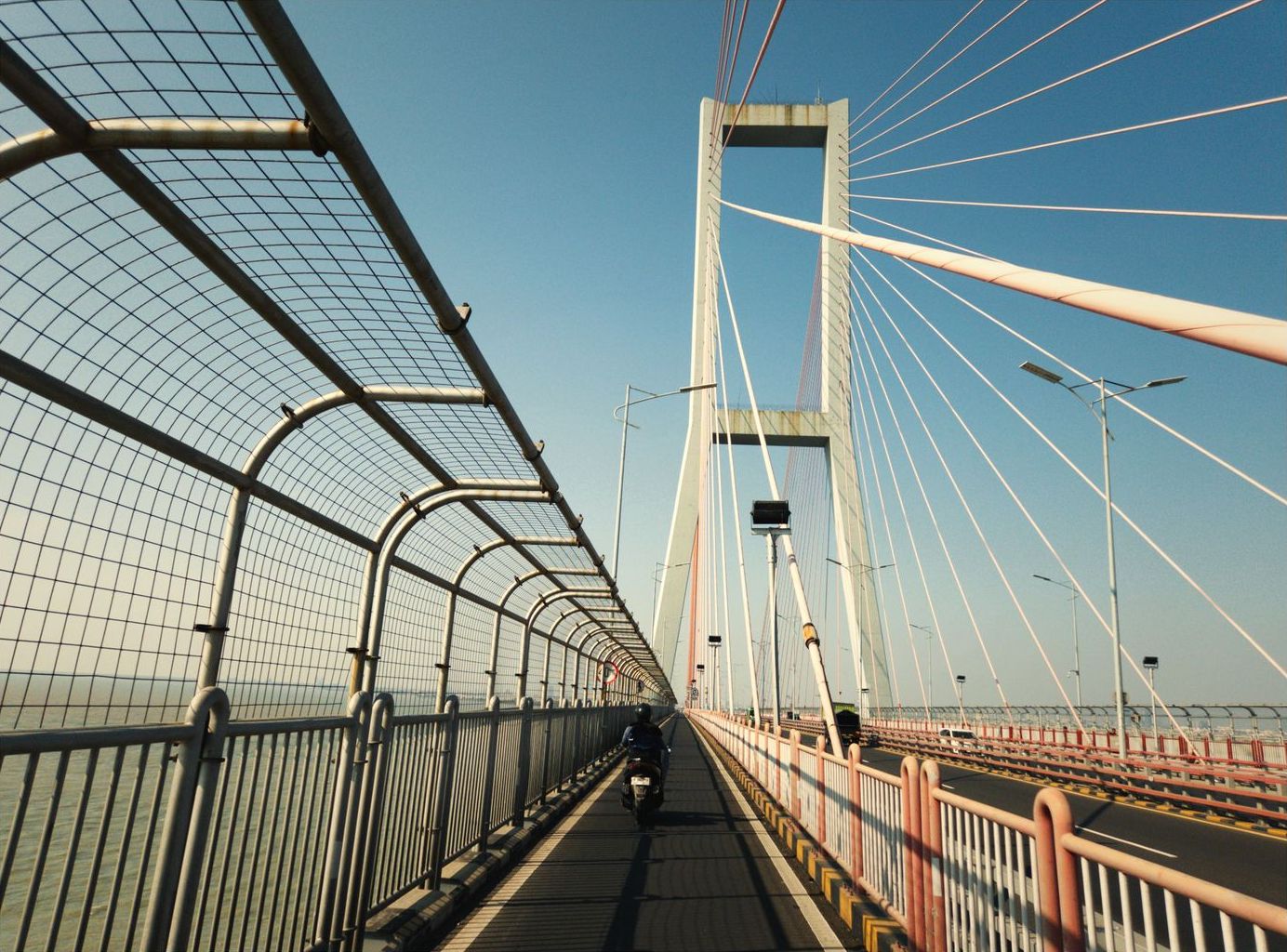
Actual camera output rendered on-device with Golden Gold 200 profile
30+ Handcrafted Film Profiles
From golden-hour portraits to moody black-and-white street photography, NeoFilm renders distinctive spectral color responses, non-linear film grain, and realistic optical halation in real time.
Portra Warm 400
Soft skin tones, gentle highlights, and warm golden undertones for editorial portraits.
FX Daily 400 PRO
Warm 90s Japanese analog aesthetic: Creamy peachy skin tones, soft amber cafe glow, and gentle highlight roll-off.
Street Mono 400
High-contrast black-and-white with deep rich blacks, gritty silver-halide grain, and punchy midtone separation.
Cinema Tungsten 500 PRO
Night cinema look inspired by motion-picture stocks, rich teal shadows, and vibrant tungsten crimson halation blooms.
Retro Slide 64 PRO
Rich color saturation, punchy warm reds, and deep dynamic range modeled after legendary reversal slide film.
CCD Flashback 02 PRO
Nostalgic Y2K digicam color balance with punchy blues, direct flash handling, and distinct vintage sensor saturation.
Tactile Mechanical Controls & RAW Capture
Take total creative authority over exposure and focus. NeoFilm replaces auto-pilot smartphone algorithms with intuitive analog wheels and tactile physical feedback.
Manual ISO & Shutter Speed
Precise sensitivity and exposure-time stepping from 1/8000s freeze-action to 1s long exposures. Available on supported devices and lenses.
Manual Focus with Live Peaking
Silky smooth manual focus dial with high-contrast color edge peaking to ensure razor-sharp focus on your subject before tripping the shutter.
Uncompressed RAW DNG Negatives
Preserve direct linear sensor data alongside your processed analog frame. Ideal for maximum latitude in post-production and digital darkroom re-development.
Live Histogram & Virtual Horizon
Real-time RGB exposure luminance graphs and hardware-accelerated dual-axis level indicators keep your framing balanced and horizons level.
Device Compatibility Notice: Full manual exposure, manual focus, and RAW DNG capture are available on supported devices and lenses. Camera hardware capabilities vary by manufacturer and device specifications.
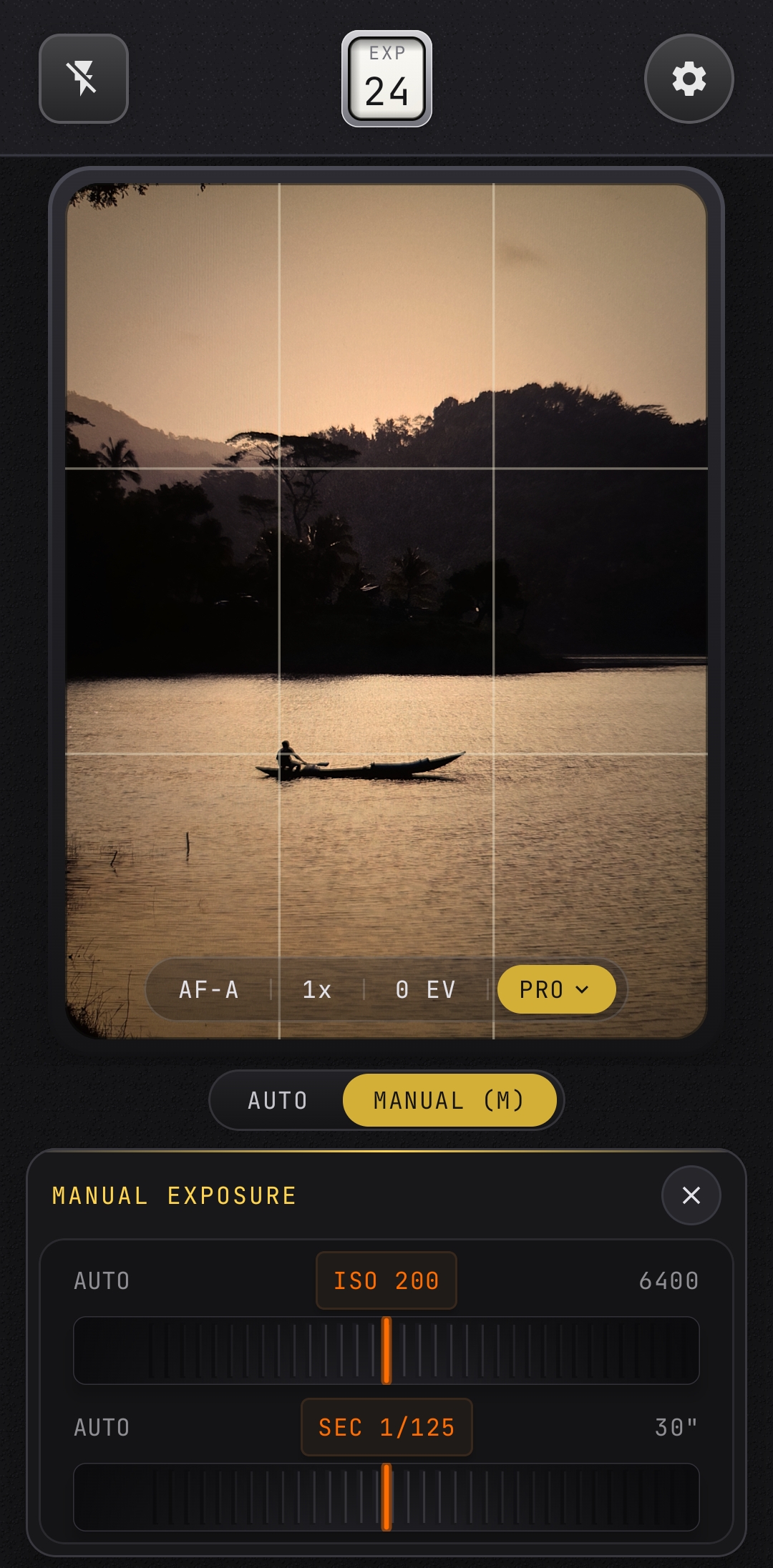
Real-time optical viewfinder with live halation and manual focus controls
Design, Save & Share Custom Film Recipes
Build your own signature aesthetic. Adjust 8-channel HSL color, highlight/shadow split tones, organic grain density, optical bloom, and light leaks — then export shareable QR cards.
Deep Tone & HSL Matrix
Control individual Hue, Saturation, and Luminance for Red, Orange, Yellow, Green, Cyan, Blue, Purple, and Magenta color channels to craft rich film palettes.
Organic Optical Effects
Layer realistic 35mm optical imperfections: analog grain density, tungsten crimson or amber halation, highlight bloom, film fade, and subtle perimeter light leaks.
QR Code Sharing & Importing
Generate compact QR recipe cards for social sharing. Point the NeoFilm scanner at any recipe code to instantly import and shoot with the recipe immediately.
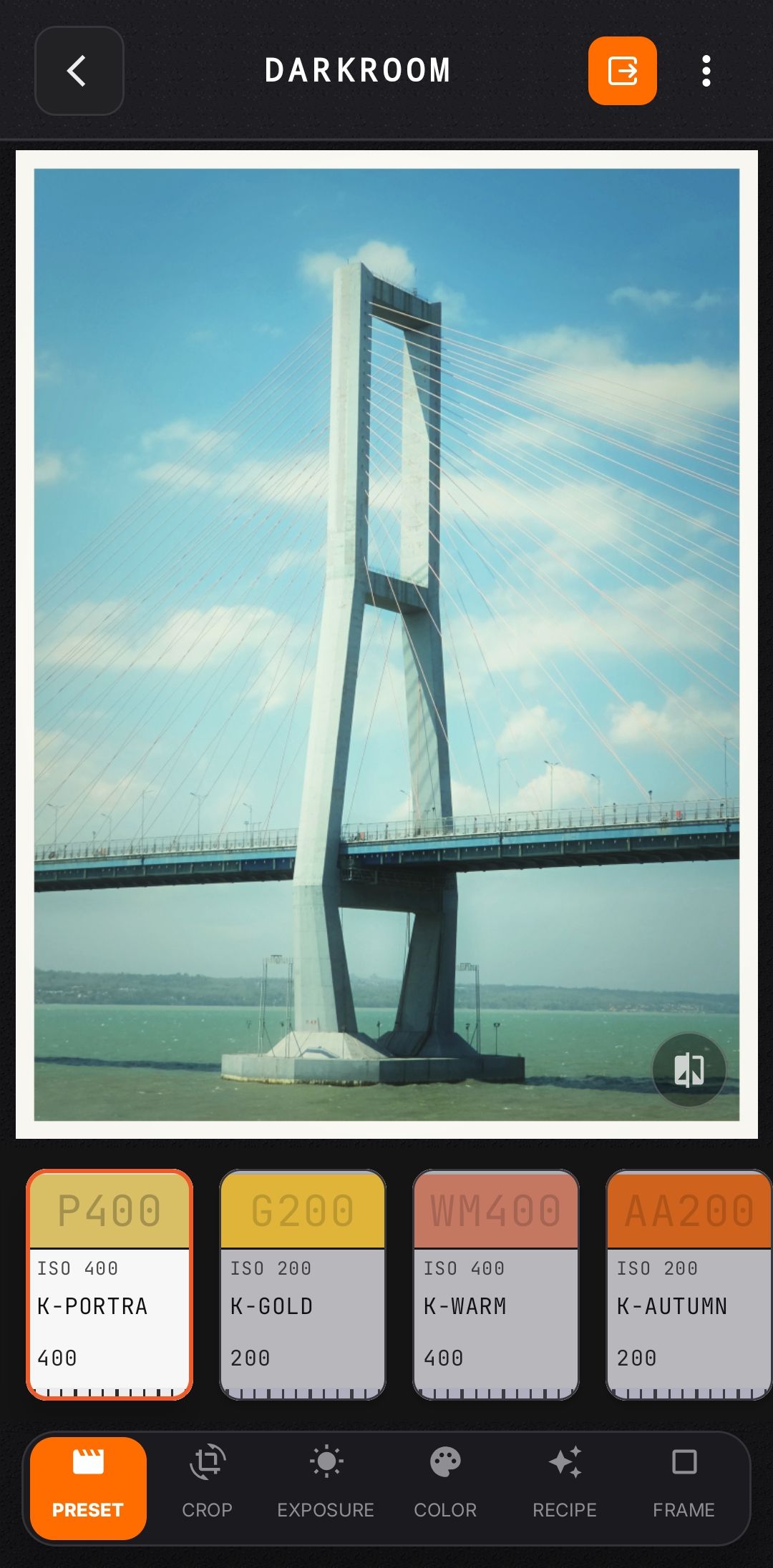
The Mobile Film Darkroom
Developing your photograph doesn’t end when the shutter clicks. NeoFilm’s built-in studio lets you re-develop captures, swap film stocks, and prepare frame-perfect exports.
- Non-Destructive Reprocessing: Change film stocks, fine-tune exposure, or apply custom recipes to previously captured frames at any time.
- Crop & Straighten: Level your horizon with precision micro-degree angle rotation and crop to classic analog aspect ratios (1:1, 4:5, 3:2, 16:9).
- Borders & Date Stamps: Authentic analog frame borders with customizable amber LCD date stamps and optional location details.
- Film-Roll Organization & Contact Sheets: Organize shots by vintage 36-exposure film rolls and export complete multi-frame contact sheets.
- Batch Export: Export your entire developed roll in full resolution without compression or watermarking.
Authentic Sample Photo Gallery
Every photograph below was captured and developed on-device with NeoFilm. No desktop post-processing, no external filters — just authentic spectral color profiles, optical halation, analog grain, and classic darkroom borders.
Built Like a Mechanical Rangefinder
Every switch, slider, and dial in NeoFilm is engineered with mechanical haptic resistance and authentic shutter sounds. From the click of the lens wheel to the tactile vibration of film advancing, NeoFilm brings physical satisfaction back to mobile photography.
Calibrated physical clicks match analog dial detents and shutter releases.
Authentic mechanical shutter sounds sampled from vintage film cameras.
Matte magnesium textures, textured grips, and focused, distraction-free viewfinders.
Optimized for iOS & Android
Engineered natively for both mobile operating systems to take full advantage of native camera sensors, Metal / OpenGL hardware acceleration, and system photo libraries.
Apple iPhone
iOS 17.0 or later- Frameworks: 100% Native SwiftUI, AVFoundation & MetalKit
- Rendering: Custom GPU Metal shaders for real-time halation
- Sensor Capture: RAW DNG via AVCapturePhotoOutput on supported models
- Haptics: Apple CoreHaptics engine integration
- Storage: Direct integration with Apple Photos and Photo Library

Android
Android 8.0 (Oreo) or later- Frameworks: Modern Jetpack Compose & CameraX
- Rendering: Hardware-accelerated OpenGL film grain & color kernels
- Sensor Capture: Camera2 RAW_SENSOR capture on supported devices
- Storage: Android Scoped Storage compliant (Media.Images)
- Privacy: No tracking permissions; 100% on-device rendering
Unleash the Complete Analog Darkroom
Whether you choose an annual pass, monthly access, or a one-time lifetime unlock, NeoFilm Pro expands your creative toolkit with complete optical film simulation and uncompressed RAW sensor control.
Annual Pass
Complete creative freedom billed once per year.
- ✓ All 30+ film profiles unlocked
- ✓ RAW DNG sensor capture
- ✓ Full manual controls & peaking
- ✓ Darkroom lab re-processing
- ✓ Unlimited batch export
A seven-day introductory trial may be available to eligible annual subscribers. Auto-renews annually unless canceled in store account settings at least 24 hours before renewal.
Lifetime Access
One-time purchase for permanent, unending access.
- ✓ Permanent access to all Pro features
- ✓ No recurring fees or renewals
- ✓ All future film profiles included
- ✓ Family Sharing on supported platforms
- ✓ One-tap Restore Purchases on new devices
Pay once for lifetime access. Permanently attached to your Apple or Google account.
Monthly Pass
Flexible month-to-month access with auto-renewal.
- ✓ All 30+ film profiles unlocked
- ✓ RAW DNG sensor capture
- ✓ Full manual controls & peaking
- ✓ Darkroom lab re-processing
- ✓ Cancel anytime with ease
Auto-renews monthly until canceled in your Apple ID or Google Play subscriptions.
Free Version vs. NeoFilm Pro
| Feature | NeoFilm Free | NeoFilm Pro |
|---|---|---|
| Handcrafted Film Profiles | Core selection (Portra, Street Mono, High Speed) | All 30+ profiles + all future releases |
| Real-Time Live Viewfinder | Included | Included |
| RAW DNG Sensor Capture | Standard Processed Capture | RAW DNG + Dual RAW/Processed mode |
| Full Manual Controls (ISO, Shutter, MF) | Auto Exposure & Manual EV | Full Manual ISO, Shutter, Focus & Peaking |
| Custom Film Recipe Lab | 1 Custom Recipe slot | Unlimited custom recipes & QR codes |
| Mobile Darkroom Reprocessing | Basic adjustments | Complete non-destructive film reprocessing |
| Photo Export | Individual high-res export | Unlimited individual & batch export |
| Watermarking / Lockout | Zero watermarks, photos are yours forever | Zero watermarks, photos are yours forever |
Transparent Billing & Secure Management
All transactions are securely processed directly by Apple (App Store) or Google (Google Play Store) and managed via RevenueCat. NeoFilm never handles or stores payment card numbers. Prices are displayed in your local currency within the app before purchase. Subscriptions can be managed or canceled at any time in your device account settings. If you switch devices, your purchases can be restored instantly with one tap using Restore Purchases.
Frequently Asked Questions
Common questions about NeoFilm features, RAW sensor compatibility, and Pro subscriptions.
How do NeoFilm presets emulate real analog film?
NeoFilm presets use composite 3D color matrices, optical halation bloom, and analog grain density curves engineered to match classic 35mm film stocks. Each profile replicates authentic tone response, highlight roll-off, and spectral color distribution on supported devices.
Can I use my NeoFilm purchase on another device?
Yes. If you are using another device on the same platform, sign in with the Apple Account or Google Account used for the purchase, then tap Restore Purchases in NeoFilm’s Settings or paywall. Purchases are tied to your store account.
What happens to my photos if I cancel my Pro subscription?
All photos saved to your phone camera roll or NeoFilm Studio remain yours forever. We never lock, watermark, compress, or delete your exported photos.
How does the seven-day trial work?
An eligible annual subscription unlocks all 30+ Pro film stocks, RAW DNG sensor capture, and manual exposure controls with an introductory seven-day trial. You can cancel anytime in your App Store or Google Play subscription settings before the trial ends to avoid recurring charges.
Where are my RAW (DNG) digital negatives saved?
When Save to Photos is enabled, RAW DNG files are saved directly to your device photo library and organized in the dedicated NeoFilm album. RAW capture availability is subject to hardware and lens support on your specific device.
How do I share or import Custom Recipes?
In the Recipe Lab, tap the QR icon to generate a shareable QR card with your custom color adjustments, grain, halation, and tone curves. In the Film Selector or Darkroom, tap the QR scanner icon to instantly import any recipe code created by other photographers.
Experience the Tactile Joy of Analog Photography
Download NeoFilm for free today. Shoot with handcrafted film stocks, control every exposure setting manually, and create photographs with authentic soul.


Available on the Apple App Store and Google Play. No ads, no image uploads, 100% on-device.